
Rust ESP, Aimbot & Weapon Controls
Choose player and team colours, filter resources and set your aim key. Full functionality requires separate Cloud DMA, GREENWARD, Static Server and AWS purchases.
Product Overview
At a glance
Key capabilities
The short list for Rust Cheats, before the full module list.
Overview
Rust ESP, aim and weapon controls
Documented controls, setup requirements and limitations for this product.
Track players, scientists, wildlife, resources, base objects, loot and vehicles in separate ESP groups. Colours and distance limits keep the categories readable.
Aim FOV, smoothing and key binds sit alongside separate recoil axis switches. Full functionality requires Cloud DMA plus GREENWARD, Static Server and AWS, all purchased separately.
Rust Cheats combines an external information overlay with aim, weapon and movement controls. Pick the ESP groups that fit your route, then configure combat options separately.
Player and scientist ESP
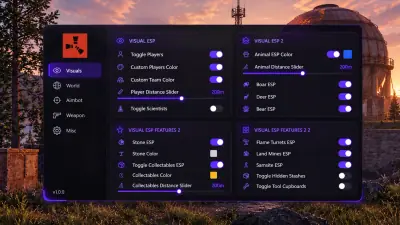
Player ESP shows people through terrain and structures. Choose a player colour and a second colour for teammates. A distance slider limits the player display. Scientists have an independent toggle, colour and distance setting, so monument NPCs remain separate from player targets.
Display style and equipment fields
Select box or skeleton rendering. Names, health, held items and held weapons can be enabled individually. Equipment information helps distinguish a player carrying a rock from one carrying a bow, rifle or launcher. Distance controls let you limit how much the overlay draws; map wide visibility is not promised.
Creature ESP
Animal ESP has its own colour and distance setting. Toggle boar, deer, bear, polar bear, wolf, horse and chicken individually. A food run can focus on the species you need, while a different configuration can keep dangerous wildlife visible along a route.
Ore and collectable filters
Sulfur, metal and stone each have a colour picker. Ore ESP also has a master switch and distance slider. Collectables use a separate group for wood, berries, hemp and food. Give sulfur a distinctive colour for a farming run without making every node look equally important. Use the ESP filter guide to plan a view for a farming run or equipment search.
Stashes, tool cupboards and traps
Stashes and tool cupboards have independent toggles. The trap group covers shotgun traps, auto turrets, snap traps, flame turrets, land mines and SAM sites with one group colour and distance control. These readouts show objects; they do not establish whether a base is safe to enter.
Dropped items and vehicles
Dropped items have a toggle, colour picker and distance slider. A weapons only filter removes other dropped item markers when you are looking for equipment. Vehicles use a separate toggle, colour and distance slider, so transport markers can be kept apart from loot.
Aimbot controls
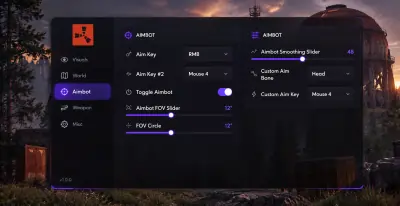
Enable the aimbot, choose its key and select an aim bone. The field of view slider sets the active aiming area, and an on screen circle makes that area visible. Smoothing changes how quickly the crosshair moves. These are aim settings; the resource and player display controls remain in the ESP groups. The aim and recoil guide explains how these controls differ from weapon settings.
Recoil and weapon handling
No recoil includes separate vertical pitch and horizontal yaw switches. No sway, no spread and no view bob are independent options. The weapon group also lists scoped recoil suppression, automatic sniper reload, always automatic and rapid fire. Recoil sliders and separate hip fire/ADS smoothing are not part of the documented controls.
Primitive weapons, melee and peeking
Instant fire options are listed for the Eoka pistol, compound bow and bow. Sprint melee, far melee and fat melee appear as separate options. Longneck and shortneck have toggles and key binds, while left and right peek have their own binds. Exact ranges and interactions for these named options are not specified here.
Movement, lighting and camera
The misc group lists spiderman, infinite jump, low gravity, no fall damage, two climb assist variants, flyhack and self kill. Climb assist and flyhack have key binds. Bright night, fullbright, keyed zoom and an FOV changer provide world and camera controls. AdminFlag and stash exploit are listed options; their names do not establish specific permissions or guaranteed results.
Overlay configuration
Adjust font and icon size, corner size, box width, skeleton size and game width. Separate sliders control the overlay update rate and render rate. The configuration group also provides close cheat and watermark controls. The interface is in English.
Required infrastructure and Windows setup
Rust Cheats requires Windows 10 or 11, at least 8 GB RAM and a dedicated GPU. HVCI, Core Isolation, TPM and Secure Boot must be enabled. Full functionality needs Cloud DMA, purchased separately. Cloud DMA then requires GREENWARD, Static Server and AWS as three distinct additional purchases. The setup uses Hyper V on one PC. A second PC or external DMA box is not the setup described here.
Delivery and updates
Checkout is external. Orders are manually reviewed, and the key and loader link appear in the account order area, typically within a few hours. Active subscribers receive compatibility updates after major patches without an additional update fee. Availability can still change between builds; confirm the current instructions before launching.
Modules
What's included
The documented options and settings for Rust Cheats.
- Player ESP with player and team colours
- Scientist ESP with independent colour and distance
- Box and skeleton display styles
- Name, health, held item and held weapon fields
- Animal ESP with seven species toggles
- Sulfur, metal and stone with per type colours
- Wood, berries, hemp and food collectables
- Trap ESP: shotgun traps, auto turrets, snap traps, flame turrets, land mines and SAM sites
- Independent stash and tool cupboard toggles
- Dropped items with weapons only filter
- Vehicle ESP with colour and distance
- Aimbot FOV slider and FOV circle
- Smoothing, aim bone and aim key
- No recoil with separate pitch and yaw switches
- No sway, no spread and no view bob
- Scoped recoil suppression and automatic sniper reload
- Always automatic and rapid fire
- Instant Eoka, compound bow and bow options
- Sprint melee, far melee and fat melee options
- Longneck, shortneck, left peek and right peek key binds
- Spiderman, infinite jump and low gravity
- No fall damage and two climb assist variants
- Flyhack key bind and self kill
- Bright night, fullbright and zoom key
- FOV changer with value slider
- AdminFlag and stash exploit options
- Font, icon, corner, box, skeleton and game width sliders
- Separate update rate and render rate sliders
- Close cheat and watermark controls
Experience
Menu groups and account delivery
Explore the documented controls below. Order review and the required infrastructure come before the first launch.
In game layers
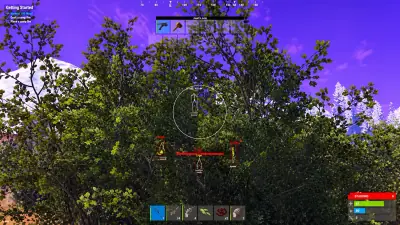
- Layer A
Bushland HUD illustration
Owner supplied artwork showing foliage, player markers and a circular aiming area; not a verified product capture.
- Layer B
Aiming interface illustration
A supplied menu concept showing aiming controls. The artwork is not verified product documentation.
- Layer C
Visual settings illustration
A supplied interface concept for player, wildlife, resource and base object settings; not an authenticated screenshot.
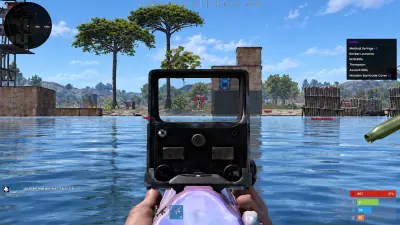
- Layer D
Waterfront HUD illustration
Owner supplied artwork showing a waterfront base and overlay elements. HUD details are illustrative.
More products
Pairs well with
Utilities sold beside the cheat. Each one keeps a separate page.
- HWID Spoofer Account sanctions remain separate. Rust is listed under EAC; ban immunity is not guaranteed. View details: HWID Spoofer
- Cloud DMA GREENWARD, Static Server and AWS are three further separate required purchases. View details: Cloud DMA
- Skin Changer Confirm the title first. This purchase adds no tradable inventory items. View details: Skin Changer
FAQ
Questions about this page
Answers for this page. The FAQ page holds the rest.
Blog
Related guides
Understand the menu and the purchase requirements before configuring your overlay.
A buyer’s checklist for Windows, five separate purchases, account delivery and patch compatibility.
How ore colours, animal switches, base objects and dropped item filters work together without filling the display.
A practical explanation of FOV, smoothing, aim binds and independent pitch/yaw switches.
Separate player and team colours, keep scientists distinct, and choose which equipment fields belong on your display.
Give sulfur, metal and stone distinct colours and keep collectable markers useful on a farming route.