
Rust Player ESP: Team Colours, Scientists and Display Style
Separate player and team colours, keep scientists distinct, and choose which equipment fields belong on your display.
Make the two player colours distinct
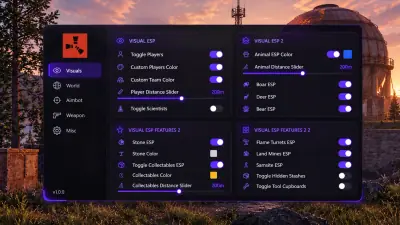
Player ESP has a main player colour and a separate team colour. Choose colours you can distinguish quickly against the terrain, then check whether the difference remains readable around grass, snow and dark structures. Colour preferences vary between people. A suggestion from another player is a starting point, rather than a setting that will suit every display or colour vision preference.
Keep scientists in their own group
Scientists have an independent toggle, colour and distance setting. This lets you show monument NPCs without giving them the same appearance as players. The player distance slider controls player rendering separately. Set each distance for the information you need to read. Increasing both ranges can add markers that compete with the nearby encounter you are trying to follow.
Choose a style and useful fields
The documented ESP styles are box and skeleton. Optional information includes name, health, held item and held weapon. Equipment fields can help you distinguish a player carrying a primitive weapon from one holding a firearm. Add fields deliberately so text remains readable. The menu’s available styles do not establish an automatic style switch for different locations or situations.
Adjust appearance before adding more information
Configuration includes font, icon, box and skeleton sizing. If labels become difficult to read, review these display controls alongside the fields you enabled. Avoid assuming that a distant or missing marker proves an area is empty; unrestricted map visibility is not established. See the Rust feature breakdown for the full controls, or use the ESP filtering guide to separate players from resources and base objects.