
Rust Aimbot and Recoil: Understand the Separate Controls
A practical explanation of FOV, smoothing, aim binds and independent pitch/yaw switches.
Aim selection and weapon behavior are different groups
The aimbot chooses and moves toward a target within its configured area. Recoil controls change weapon behavior. ESP supplies information. Understanding those distinctions makes the menu easier to read and prevents a recoil option from being mistaken for an aiming preset. Review the complete feature list alongside this guide.
Define the aiming area
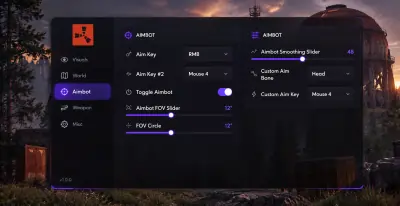
The FOV slider sets the active area and the FOV circle shows it on screen. Choose an aim bone and assign an aim key. Those controls describe where and when aiming operates. A maximum targeting distance slider and visibility check toggle are not documented. The gallery illustrations do not confirm additional controls.
Understand what smoothing changes
The smoothing slider changes how quickly the crosshair travels. It does not establish safety from anti cheat review or guarantee a natural looking result. Separate hip fire and ADS smoothing controls are not documented. Use the actual menu labels rather than trying to copy numbers from another product’s screenshots. The overlay configuration has its own update rate and render rate sliders, which are different from aim smoothing.
Split recoil by axis
No recoil has a master switch plus vertical pitch and horizontal yaw switches. One axis can be controlled while the other remains unchanged. No sway, no spread and no view bob are separate toggles. The weapon list additionally includes scoped recoil suppression and automatic sniper reload. A recoil strength slider is not documented.
Treat named options conservatively
Always automatic, rapid fire and instant fire options for Eoka, compound bow and bow are listed. Melee and peek options are also named, but their exact ranges and interactions are not established. Do not infer a range, permissions change or guaranteed result from a label such as AdminFlag or fat melee. After a patch, check current instructions before relying on any module. The FAQ covers dependencies, updates and capture behavior.