Your Rust Experience. Elevated. Your Advantage.

Rust Cheats

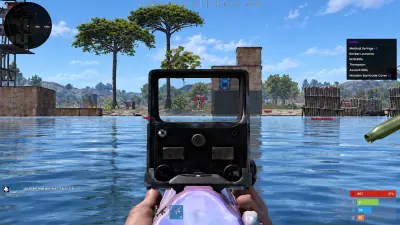
See players, loot, ores and base objects through walls. Set your aim and recoil controls. Full functionality requires Cloud DMA plus three separate dependencies.

Rust illustration of leafy bushes under a purple sky, with skeleton markers and a circular aiming area.

ESP

Players & resources

Aim

FOV & smoothing

10 / 11

Windows support

Cloud DMA

Required separately

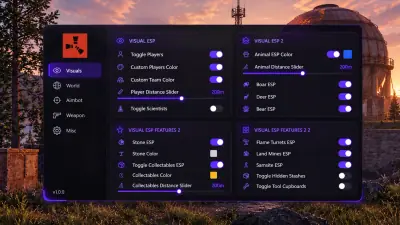
Player & scientist ESP
Ore & collectable ESP
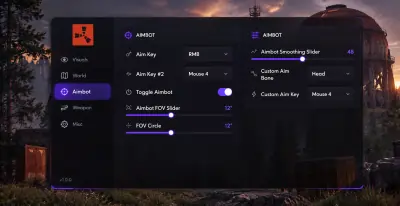
Aimbot
No recoil
Base & trap ESP
Dropped loot ESP
Movement tools
Creature & vehicle ESP
Overlay settings
Cloud DMA
Hyper V
Windows 10 & 11
Rust
8 GB RAM minimum
Dedicated GPU
HVCI & Core Isolation on
TPM & Secure Boot on
Single PC Hyper V
Player & scientist ESP
Ore & collectable ESP
Aimbot
No recoil
Base & trap ESP
Dropped loot ESP
Movement tools
Creature & vehicle ESP
Overlay settings
Cloud DMA
Hyper V
Windows 10 & 11
Rust
8 GB RAM minimum
Dedicated GPU
HVCI & Core Isolation on
TPM & Secure Boot on
Single PC Hyper V

Features

Rust cheats for the routes, fights and bases ahead

Choose what the overlay shows, then tune aim and weapon behavior separately. Each group has its own controls.

Player & scientist ESP

Read the next encounter.

See players through cover with names, health and held equipment. Scientists have their own controls.

  • Player and team colours
  • Separate scientist toggle
  • Box or skeleton style
  • Player distance slider
  • Name and health fields

Ore & collectable ESP

Find the materials you need.

Give sulfur, metal and stone different colours. Filter wood, berries, hemp and food on farming routes.

  • Per ore colours
  • Ore distance slider
  • Hemp and berries
  • Wood and food

Aimbot

Set the aiming area.

Choose an aim key and target bone. Adjust the FOV and smoothing to control target selection and crosshair movement.

  • FOV slider
  • Visible FOV circle
  • Smoothing slider
  • Aim bone and key

No recoil

Control each axis.

Toggle vertical and horizontal recoil separately. Sway, spread and view bob have their own switches.

  • Pitch and yaw toggles
  • No sway
  • No spread
  • No view bob

Base & trap ESP

Check what guards the base.

Show stashes, tool cupboards and defensive objects. The trap group covers turrets, mines and SAM sites.

  • Hidden stash toggle
  • Tool cupboard toggle
  • Trap colour and distance
  • Shotgun and flame traps

Dropped loot ESP

Keep the view readable.

Show dropped items with colour and distance controls. Use the weapons only filter when other loot becomes clutter.

  • Dropped item toggle
  • Weapons only filter
  • Custom colour
  • Distance slider

Movement tools

Configure traversal options.

The misc group lists infinite jump, low gravity, no fall damage and two climb assist options.

  • Infinite jump
  • Low gravity
  • Climb assist key
  • Flyhack key

Creature & vehicle ESP

Track wildlife and transport.

Filter animals by species and show vehicles separately. Each group has colour and distance controls.

  • Seven animal species
  • Animal distance slider
  • Vehicle toggle
  • Vehicle colour

Overlay settings

Adjust the display.

Tune text, icons, boxes and skeletons for readability. Update rate and render rate use separate sliders.

  • Font and icon size
  • Box and skeleton size
  • Update rate slider
  • Render rate slider

Store

Our products

Compare the cheat menu and the utilities on this grid. Open a product page for the feature list and checkout.

HWID Spoofer for Rust PCs

Refresh disk, MAC and GPU identifiers for a confirmed hardware ban. Cleanup is included.

Account sanctions remain separate. Rust is listed under EAC; ban immunity is not guaranteed.

  • Disk serial rewrite
  • MAC rewrite
  • GPU ID rewrite

Cloud DMA

Required for full Rust functionality, using Hyper V on one PC.

GREENWARD, Static Server and AWS are three further separate required purchases.

  • Setup on one PC
  • Guided Hyper V installation
  • Encrypted activation

Why us

Know which controls you are buying

The feature list separates Rust specific tools from setup requirements. Availability at other providers varies.

  • Filters for farming

    Sulfur, metal and stone have individual colours. Collectables use their own group and distance control.

  • Adjustable aim

    A field of view circle, smoothing, aim bone and a key bind define how you use the aimbot.

  • Base objects in view

    Stashes and tool cupboards have independent toggles. Traps share colour and distance controls.

  • Separate recoil axes

    Turn pitch and yaw control on or off independently of sway, spread and view bob.

  • Requirements up front

    Windows 10 or 11, 8 GB RAM and a dedicated GPU are required. Cloud DMA is purchased separately.

  • Account order delivery

    Keys and the loader link appear in the account order area after manual review, typically within a few hours.

3 types

Ore colours

Sulfur, metal and stone each get a colour you choose.

7 species

Animal filters

Toggle boar, deer, bear, polar bear, wolf, horse and chicken.

2 axes

Recoil controls

Vertical pitch and horizontal yaw have separate switches.

Setup guide

Prepare your PC, then follow the setup guide

Rust access and its infrastructure are separate purchases. Check the complete dependency list before checkout.

  1. Check Windows and dependencies

  2. Wait for account delivery

  3. Follow the current setup instructions

How it works

From requirements to your overlay.

Check the whole setup before ordering. Keys and the loader arrive after manual review.

4 easy steps

  1. 01

    Review requirements

    Check Windows security, hardware and the separate Cloud DMA dependency chain.

  2. 02

    Review each purchase

    Rust Cheats, Cloud DMA, GREENWARD, Static Server and AWS are separate purchases.

  3. 03

    Open your account order

    After review, find your key and loader link in the account order area.

  4. 04

    Set filters and key binds

    Follow the current guide, then choose ESP groups, aim controls and overlay sizes.

Blog

Guides and updates

Practical guides to Rust ESP filters, aim controls, dependencies and hardware ban questions.

A buyer’s checklist for Windows, five separate purchases, account delivery and patch compatibility.

How ore colours, animal switches, base objects and dropped item filters work together without filling the display.

FAQ

Questions about this page

Answers for this page. The FAQ page holds the rest.