
Client Skin Changer for Supported Titles
Local weapon finishes, outfits and knife styles in supported games.
Library
The finish library on this PC
The library provides local weapon finishes, outfits and knife styles for supported titles. It changes the picture on your display, without granting inventory ownership.
4 cosmetic rows continue lower on this page.
Overview
Local cosmetics for supported games
Where the finish is drawn, what stays out of your inventory, and how to check a title before checkout.
The client provides premium weapon finishes, character outfits and knife styles in supported games. You select looks from its library rather than buying each visual separately. Other players are not expected to see those changes.
The client changes the local picture. It does not add items to your account inventory, grant tradable goods or transfer marketplace ownership. Closing the client removes the cosmetic display. The same cosmetic library is available across its listed access terms.
Cosmetics rendered on your own display
The client provides premium weapon finishes, character outfits and knife styles in supported games. You select looks from its library rather than buying each visual separately. Other players are not expected to see those changes.
Visual access is not inventory ownership
The client changes the local picture. It does not add items to your account inventory, grant tradable goods or transfer marketplace ownership. Closing the client removes the cosmetic display. The same cosmetic library is available across its listed access terms.
Confirm the game before purchase
Title coverage can change with game or Windows updates. Ask support whether the exact game and cosmetic type you want are supported. This page does not establish Rust compatibility. A cosmetic only client can still conflict with game rules and lead to account action.
Windows and account access
Prepare 64 bit Windows 10 or 11 with HVCI, Core Isolation, TPM and Secure Boot enabled. Use the loader and instructions delivered with your account access. Keep the cosmetic purchase separate from Rust Cheats, Cloud DMA and the hardware recovery utility. Compare the products by purpose before choosing a separate utility.
Groups
Cosmetic groups
These finish types are available once the cosmetic license is active.
- Presets for premium weapon finishes
- Presets for character outfits
- Presets for rare knife styles
- Coverage across major titles
- A lightweight client on this PC
- Cosmetic drawing on this screen only
- Monthly and lifetime cosmetic licenses
- Windows 10 and Windows 11 support
When access arrives
Shots, then portal access
Check title coverage first. After account delivery, follow the cosmetic client instructions for your Windows setup.
Shots
- Layer A
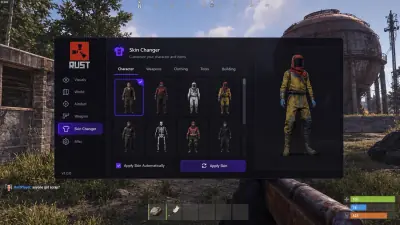
Character menu illustration
Owner supplied interface concept showing outfit choices and a character preview; not verified product documentation.
- Layer B
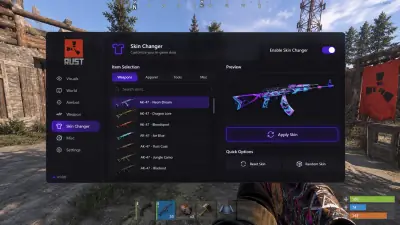
Weapon menu illustration
Owner supplied interface concept showing weapon finishes and a rifle preview; not verified product documentation.
More products
Pairs well with
The catalog beside this cosmetic client, with a separate page for each license.
- Rust Cheats Player, resource and base object ESP with adjustable aim and separate recoil axes. View details: Rust Cheats
- HWID Spoofer Account sanctions remain separate. Rust is listed under EAC; ban immunity is not guaranteed. View details: HWID Spoofer
- Cloud DMA GREENWARD, Static Server and AWS are three further separate required purchases. View details: Cloud DMA
FAQ
Questions about this page
Answers for this page. The FAQ page holds the rest.
Blog
Related guides
Understand the menu and the purchase requirements before configuring your overlay.
What local cosmetic changes mean for your screen, inventory and purchase decision, with Rust support still unconfirmed.
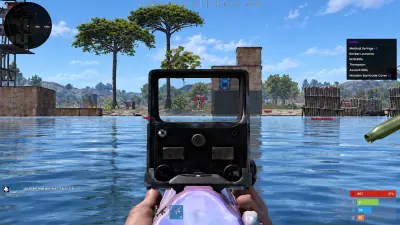
A buyer’s checklist for Windows, five separate purchases, account delivery and patch compatibility.